
Camera Stands and Interplanar Projectors for Advanced Setups
Camera Stand
The  Camera Stand is a utility block designed to hold a camera in place for static or timed shots. It is crafted with a shaped recipe requiring one
  Iron Ingot, four
  Sticks, and two
 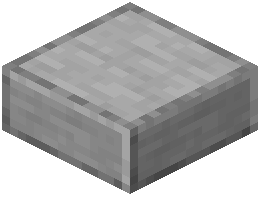 Smooth Stone Slabs. The exact arrangement of these items in the crafting grid will produce the stand.
Once placed, the stand functions as a mount. You can position a camera on it to keep the framing steady, which is useful for long-exposure photography, group portraits, or any situation where hand-held shots would introduce unwanted motion. The stand does not require power or redstone to operate; it is a purely mechanical support.
Interplanar Projector
The  Interplanar Projector is a more complex device that alters how photography interacts with dimensions. This item has a distinct right-click behavior: right-clicking it changes its mode. The mode determines the projector’s function in your setup.
Critically, the projector is consumed on use. This means that once you activate its effect, the projector is permanently destroyed. There is no way to recover it after triggering, so plan your shots carefully before using one. Because it is single-use, you should reserve it for moments where the outcome justifies the cost.
The projector’s primary role is to enable advanced camera setups that bridge the gap between the Overworld and other dimensions. While the exact mechanics are not detailed here, the implication is that it allows a camera to capture or project images across dimensional boundaries — something a standard camera cannot do.
Practical Setup Advice
To build an advanced photography station, consider the following workflow:
- Craft multiple Camera Stands if you need several angles simultaneously, as each stand holds one camera.
- Keep a stock of Interplanar Projectors only if you have a specific cross-dimensional shot in mind, since they are lost after activation.
- Test your camera angle and focus on a regular stand first. Only then commit to using the projector, because its consumption makes trial-and-error expensive.
- Right-click the projector to cycle through its modes until you find the one matching your intended effect. There is no visual indicator described here, so you may need to experiment in a safe area before the real shot.
Combining Both Items
For a fully advanced setup, place a camera on a stand for stability, then use the Interplanar Projector nearby to enable the dimensional effect. The stand ensures the camera does not move, while the projector handles the exotic mechanics. Remember that the projector’s consumption means the entire setup is a one-time event — after the shot, you will need to rebuild the projector if you want to repeat it.
If you are unsure about a mode’s behavior, use the projector in a low-stakes environment first. Because it is consumed on use, every activation is permanent, so there is no downside to testing in a location where a wasted shot does not matter.
Final Notes
Neither item requires maintenance or fuel. The Camera Stand is reusable indefinitely. The Interplanar Projector is not. Treat the projector as a consumable resource, like film or a flash charge, and treat the stand as durable equipment. With this combination, you can achieve stationary, cross-dimensional photography that would otherwise be impossible with handheld equipment alone.
Covers the mod’s in-game guide topics: Camera Stand Interplanar Projector
 Photograph
 Camera