
Numismatic Overhaul: A Currency System in Seven Pages
Numismatic Overhaul adds currency to Minecraft, and every piece of it starts with a single coin. The mod's economy runs on  Bronze Coin, the base unit you will handle constantly once you begin crafting the blocks that store and spend money. This guide covers what the mod's crafting recipes produce and how the two central blocks — the
  Piggy Bank and the
 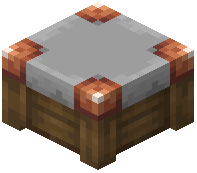 Shop — fit into a currency system.
Getting Started With Currency
Everything in this system traces back to Bronze Coin. It is the ingredient that appears in both of the mod's crafting recipes, which means your first task in any currency setup is acquiring coins. Once you have them, you can convert them into functional blocks rather than carrying loose change around.
The mod keeps its crafting simple. There are only two recipes to learn, and both consume Bronze Coin alongside ordinary vanilla materials. That means you do not need a long progression chain or rare drops to participate in the economy — you need coins, and you need a few basic blocks and items you already know how to gather.
The Piggy Bank
The Piggy Bank is the smaller of the two craftable blocks and the cheaper one to make. Its recipe is shaped and takes a single Bronze Coin combined with a  Flower Pot. That is the entire cost: one coin and one pot.
Because the Piggy Bank only asks for one Bronze Coin, it is the natural first craft for anyone testing the currency system. A Flower Pot is trivial to obtain, so the real gate is the coin itself. Once you have both ingredients arranged in the correct shaped pattern, you have a place to put your money.
The Shop
The Shop is the larger investment. Its shaped recipe requires two Bronze Coin, one 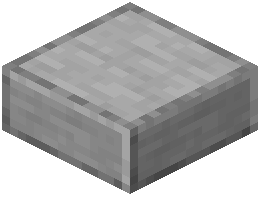 Smooth Stone Slab, and three
 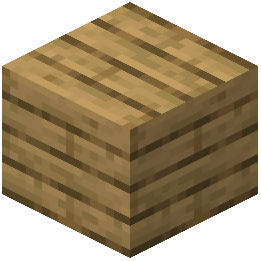 Oak Planks. Compared to the Piggy Bank, this costs an extra coin plus the stone and wood materials.
The Shop is where the currency system becomes more than storage. While the Piggy Bank handles a single coin's worth of crafting input, the Shop consumes double the coins and adds building materials on top. If you are setting up an economy for a server or a long-term single-player project, the Shop is the block you will craft repeatedly, and the Bronze Coin cost scales with each one you make.
Planning Your Materials
Because both recipes share Bronze Coin as their common ingredient, your material planning is straightforward. Count how many Piggy Bank blocks you want, add two Bronze Coin for every Shop, and gather the vanilla materials separately.
- Each Piggy Bank needs one Bronze Coin and one Flower Pot.
- Each Shop needs two Bronze Coin, one Smooth Stone Slab, and three Oak Planks.
The vanilla side of these recipes is easy to stockpile. Flower Pot blocks are simple to make in quantity, Smooth Stone Slab comes from smelting and cutting stone, and Oak Planks come from any oak log you chop. The limiting factor in every case is Bronze Coin, so build your coin supply first and let the other materials follow.
How the Two Blocks Work Together
Think of the Piggy Bank as the entry point and the Shop as the expansion. A single Bronze Coin and a Flower Pot get you a working piggy bank with minimal commitment. From there, every Shop you craft costs two Bronze Coin plus a Smooth Stone Slab and three Oak Planks, letting you scale up as your coin reserves grow.
Neither recipe is complicated, and neither demands exotic ingredients. The design keeps the barrier low: if you can find Bronze Coin, you can build both blocks, and the rest of the recipe is ordinary Minecraft crafting. Start with one Piggy Bank, then reinvest into Shop blocks as your supply of Bronze Coin allows.